Chapter 1. General information 1.4. eCATALOG/ENTERPRISE modules in context
|  |
| Prev | Next |
![[Note]](images/note.png) | Note |
|---|---|
This section provides background information. You are welcome to skip it for a quick introduction. | |
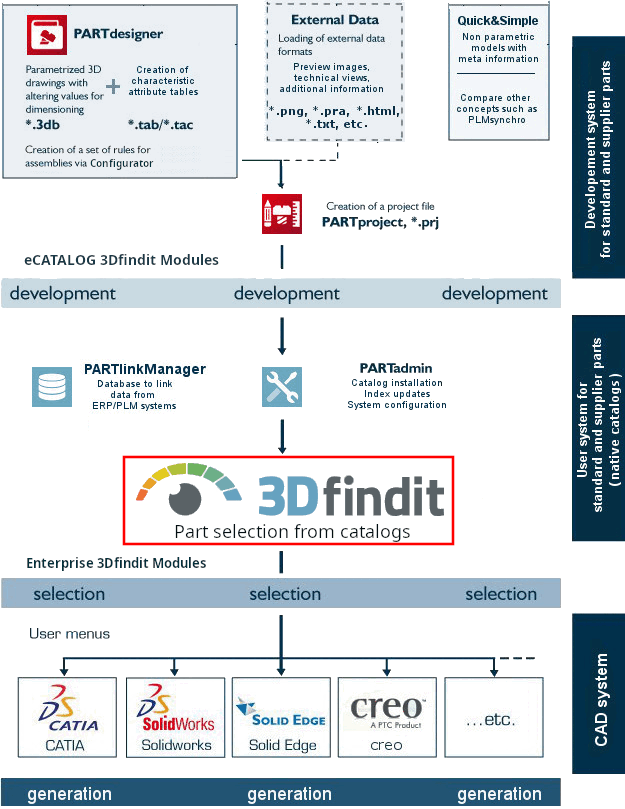
The following graphic shows the eCATALOG 3Dfindit and ENTERPRISE 3Dfindit modules in context.
This manual explains the functionalities in the 3Dfindit module, in particular the parts selection (standard parts, purchased parts, own parts) but also the export to the CAD system, the interface functions and all helpful additional functions such as setting favorites, etc.
The following list shows further eCATALOG 3Dfindit and ENTERPRISE 3Dfindit modules with links to the corresponding chapters in other manuals:
PARTproject: The central control center in eCATALOG 3Dfindit.
See Chapter 5, PARTproject in eCATALOG 3Dfindit.
PARTdesigner: Create geometry and attribute table
See Chapter 7, PARTdesigner in eCATALOG 3Dfindit.
Quick&Simple: Non-parametric models with meta information
See Section 5.13, “Create catalogs - Quick & Simple ” in eCATALOG 3Dfindit.
ENTERPRISE 3Dfindit Admin manual
PARTadmin: Catalog installation, index updates, system configuration, etc.
See Chapter 1, 3Dfindit administration via PARTadmin in ENTERPRISE 3Dfindit (Professional) - Administration.
PARTlinkManager (optional): Link database for linking data from ERP/PLM systems
See Chapter 5, Strategic Parts Management in ENTERPRISE 3Dfindit (Professional) - Administration.