1.8.2. Beispiele 1.8.2.2. Beispiel 2: Import-Pfad mittels “DTO“
setzen |  |
| Zurück | Weiter |
Ein weiteres Beispiel wie man den Import-Pfad setzen kann, wenn Produkte verfügbar sind:
Erstellen Sie einen VBS filter
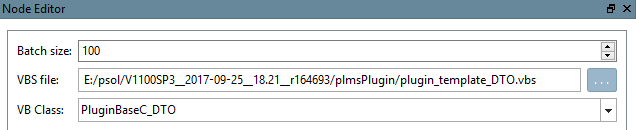
node (irgendwo in der Pipeline nachdem der Konverter gelaufen ist). Setzen
Sie VBS file (plugin_template_DTO.vbs) und
VB
Class (PluginBaseC_DTO).
Fügen Sie folgenden Code bei der Funktion
DTO ein:
 ' Create new classification
  Dim classification As PSolUnitProxy.prxClassification_1
  Set classification = CreateObject("wh.Classification_1")
  classification.SystemId = "customID"

  ' Prepare attribute.
  Dim newAttr As PSolUnitProxy.prxProductAttribute_1
  Set newAttr = CreateObject("wh.ProductAttribute_1")

  ' Prepare the attribute value.
  Dim newAttrVal As PSolUnitProxy.prxAttributeValue_1
  Set newAttrVal = CreateObject("wh.AttributeValue_1")
  newAttrVal.Text = "newtestpath/whatever“ ‘ Import Path for parts

  newAttr.Name = "imppath_"
  newAttr.Group = "imppath"
  Set newAttr.Value = newAttrVal

  ' Add Attribute to classification
  classification.addAttributeValue(newAttr)
  ' Add classification to product
  product.addClassification(classification)
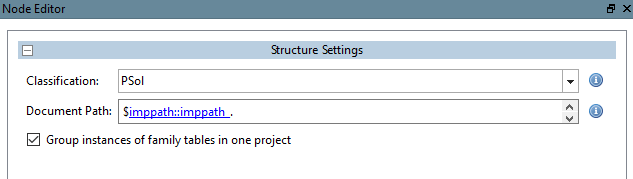
Bearbeiten Sie den Structure Node in PARTdataCenter.
Document Path: imppath (Group of attribute); imppath_ (Name)
| In Klassifikation: |
   "SystemId": "customID",
   "AttributeValue": [
       {
           "Name": "imppath_",
           "Group": "imppath",
           "Value": {
               "Text": "newtestpath2/whatever"
           }
       }
   ]
|