1.5.5.2. Additional
information 1.5.5.2.1. Activation of the 3Dfindit interface in Creo Parametric
|  |
| Prev | Next |
1.5.5.2. Additional
information 1.5.5.2.1. Activation of the 3Dfindit interface in Creo Parametric
| |
| Prev | Next |
After installing the 3Dfindit interface for Creo Parametric, you have various options for activating the interface:
In future, the 3Dfindit interface will be started automatically together with Creo Parametric.
Expand your existing file config.pro (Creo Parametric Installation/.../text/) with the protkdat key. This contains the path to the protk<name>dat file, which is located in the "iface" interface directory.
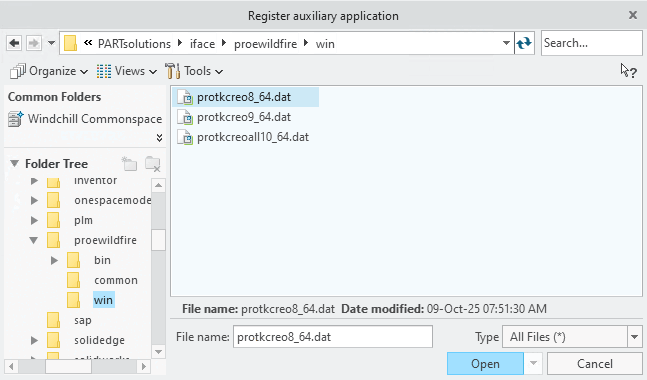
protkdat $CADENAS\iface\proewildfire\win\protkcreo8_64.dat
Make sure the file name is correct.
Adjust the file name according to your Creo Parametric version.
The 3Dfindit interface should only beavailable each time Creo Parametric is started after manual activation.
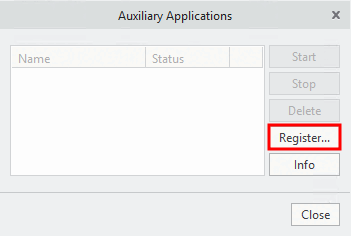
In the
PARTsolutions installation directory under .../iface/proewildfire/win , open the file protk<version>.dat (e.g. protkwf8.dat ).
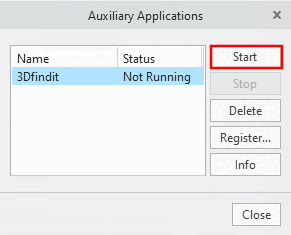
In the Auxiliary applications window, select the new line 3Dfindit and then click on .
-> The 3Dfindit interface appears in the Creo Parametric menu bar.
![[Note]](images/note.png)