2.1.6.4.6.
Geometric search (3D)
2.1.6.4.6.4.
Projects tab page
|  |
| Prev | Next |
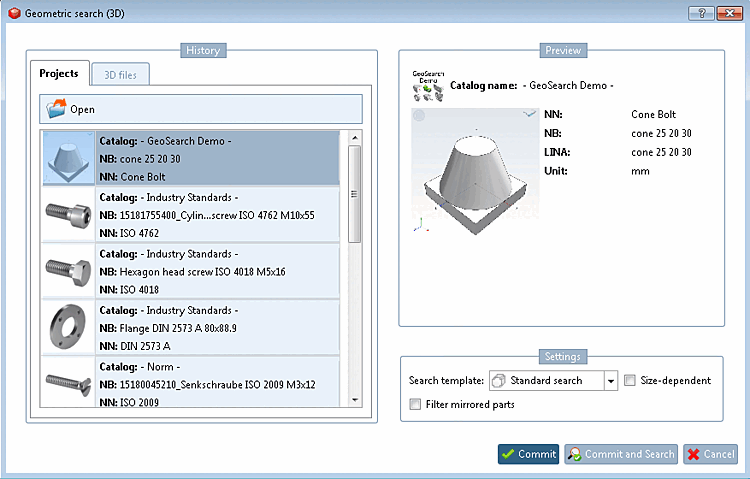
If you select the Projects tab page, the most recently loaded parts are listed. You then only need to select the search part and it will be displayed on the right under Preview.
If the required search part is not yet displayed in the History dialog area, you must first load it in the part view [Part view] or execute the Geometric search (3D) via a context menu command:
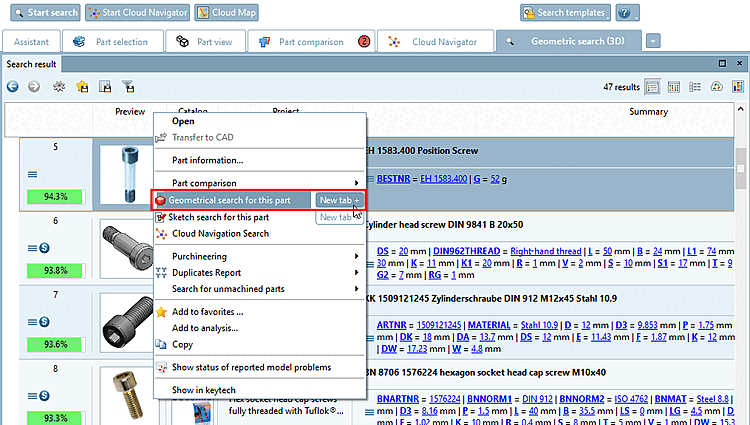
You can start a geometric search using the context menu command Geometric search for this part [Geometrical search for this part] of each result part. It is then also listed under History.
You can also find the context menu command Search geometrically for this part [Geometrical search for this part] in the directory structures of the Catalogs, Classes, Favorites, History and Analyses Tabbed pages.
Example: "Search geometrically for this part [Geometrical search for this part] " on the "Catalogs [Catalogs] " tab page
You can also find the context menu command Search geometrically for this part [Geometrical search for this part] in the part view [Part view] in the References [Links] dialog area.
![[Note]](images/note.png)
![Example: "Search geometrically for this part [Geometrical search for this part] " on the "Catalogs [Catalogs] " tab page](resources/img/img_322e437c460449e4a7dd39fb01b532af.png)