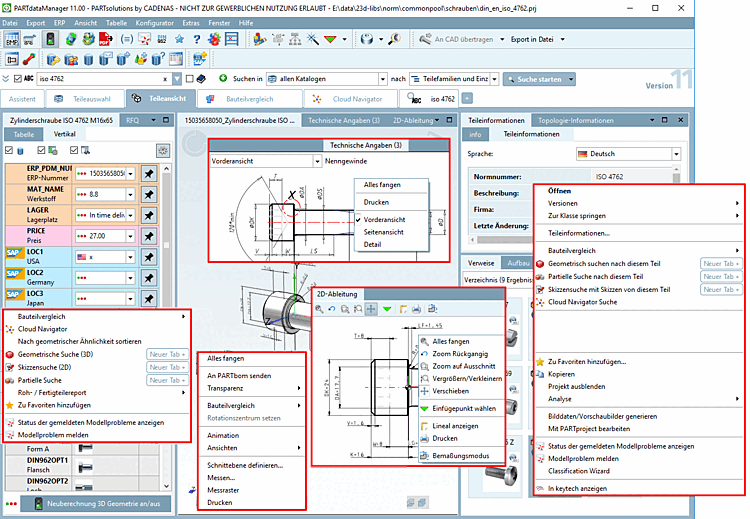
3.1.17.6.2.  Part view context menu commands
3.1.17.6.2.1. Overview
3.1.17.6.2.2. Context menu commands in the "3D view " docking window
3.1.17.6.2.2.1. Zoom all
3.1.17.6.2.2.2. Send to PARTbom/ Selected components
3.1.17.6.2.2.3. Transparency
3.1.17.6.2.2.4. Part comparison
3.1.17.6.2.2.5. Animation / Set center of rotation
3.1.17.6.2.2.6. Views
3.1.17.6.2.2.7. Normal to face
3.1.17.6.2.2.8. Enter rotation angle
3.1.17.6.2.2.9. Define section cut...
3.1.17.6.2.2.10. Measuring 3D parts
3.1.17.6.2.2.11. Measuring grid
3.1.17.6.2.2.12. Print
3.1.17.6.2.2.13. Specific commands for assemblies
3.1.17.6.2.3. Context menu commands in the "2D derivation " docking window
3.1.17.6.2.3.1. Choose insertion point
3.1.17.6.2.3.2. Show coordinate system
3.1.17.6.2.3.3. Print
3.1.17.6.2.3.4. Attributes -> Dimensioning mode
3.1.17.6.2.4. Context menu commands in the "Technical specifications " docking window
3.1.17.6.2.5. Context menu commands in the "Links " docking window
3.1.17.6.2.6. Context menu commands in the "Table " docking window

To open the context menu , click with the secondary mouse button in the respective dialog area.

Part view

Part view