2.1.12.4. Basics
concerning all analyses
2.1.12.4.7.
Analysis management - Call up created analyses again later
|  |
| Prev | Next |
2.1.12.4. Basics
concerning all analyses
2.1.12.4.7.
Analysis management - Call up created analyses again later
| |
| Prev | Next |
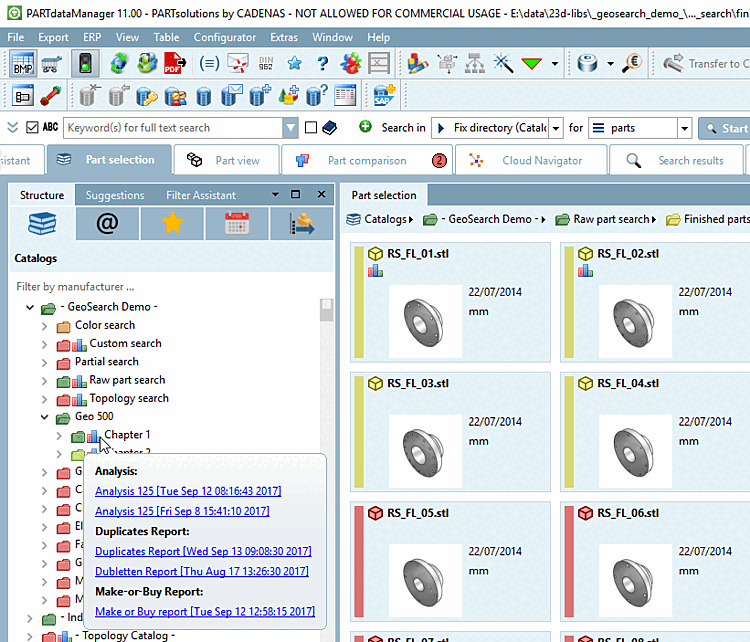
Analyses are
marked by a special icon  in the index tree on directory and project level
:
in the index tree on directory and project level
:
If the mouse is moved over the icon
icon, brief information appears with the available analyses.
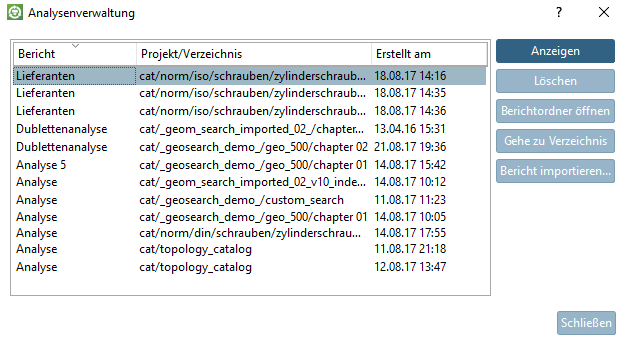
Click on the icon icon opens the relevant analysis. If several are available, the Analysis management [Manage analyses] dialog box opens to select the desired analysis.
Context menu of any directory -> Analysis -> Analysis management [Analyses management...]..
-> The Analysis management [Manage analyses] dialog box opens.
Afterwards the following functions are available:
![[Note]](images/note.png)