1.8. More
administrative setting options 1.8.4. Command line tool for automated setup processes
|  |
| Prev | Next |
1.8. More
administrative setting options 1.8.4. Command line tool for automated setup processes
| |
| Prev | Next |
The new
Command-line tool ppwutil.exe is an executable file
which can be found under $CADENAS\bin\x86 . They
can be used in automated setup processes to set different values according to the
installation in the configuration files of CADENAS.
It is possible to enter passwords of users and set passwords for
databases or API accesses without having to take a detour via
graphical tools.
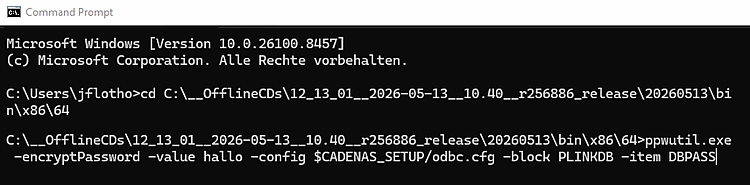
Perform
ppwutil.exe with the desired
parameters in a command prompt.
The following arguments are possible:
stdout: outputs result to stdout (for control or other scripting)
config: Path to the config ($CADENAS_SETUP/xyz.cfg). SITESETUP and diffing are taken into account here, but NO active pappclient.cfg/CADENAS_APPSERVER.
replace: Argument is used as a replacement parameter. This can be used to replace substrings. However, the parameter must be in the config beforehand.
template: this specifies the entry template on the command line
ppwutil.exe
    -encryptPassword -value hallo -config $CADENAS_SETUP/odbc.cfg -block
    PLINKDB -item DBPASS
ppwutil.exe
    -encryptPassword -value hallo -config $CADENAS_SETUP/psolrights.cfg -block
    DB -item dbopenid -replace pwd
ppwutil.exe -encryptPassword -value hallo -config
    $CADENAS_SETUP/psolrights.cfg -block DB -item dbopenid -replace pwd
    -template
    "openid,1,https://login.microsoftonline.com/12-34-56/,(...),pwd"
Example 1.1. Various input options