1.3.8.6.5.5.
Table mode / LinkDB mode in dialog "Manage index"
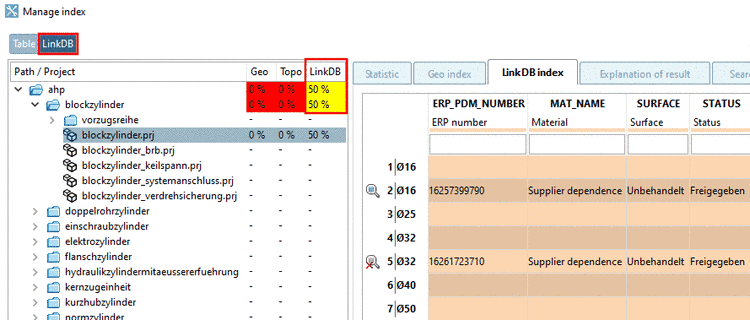
When clicking on
one of the two buttons, you switch between table mode and
LinkDB
mode:
Table mode:
Only lines from table are considered.
LinkDB mode:
Only lines from LinkDB are considered.
Ideally the
value should always be at 100%. If new ERP numbers have been added,
the value falls under 100% and the LinkDB index should be updated.
Colors:
Green: All
lines with LinkDB entry are indexed.
Yellow:
Some lines with LinkDB entry are indexed.
Red: No
line with LinkDB entry is indexed.
White (-):
For these projects/folders there are no entries in the LinkDB, meaning
nothing that could be indexed.
On the tabbed
page LinkDB index, in the table, the icon at the
beginning of the line signalizes which lines are indexed and which
not.
 indexed
 not indexed