3.3.6.1. Block
[CreationOptions(is3d)] 3.3.6.1.1.
Key "poolpath" - Set storage path for 3Dfindit parts
|  |
| Prev | Next |
3.3.6.1. Block
[CreationOptions(is3d)] 3.3.6.1.1.
Key "poolpath" - Set storage path for 3Dfindit parts
| |
| Prev | Next |
In the poolpath key, you set the directory in which all components created by 3Dfindit are saved.
You can use both the standard pool path and a library path from the Inventor project as pool path.
poolpath(isCreaOptNotSet)=?_FORMAT_0("$CADENAS_DATA/pool/inventor/<PREFIXLIST(/)>").value()
In order to change the standard pool path, do the following:
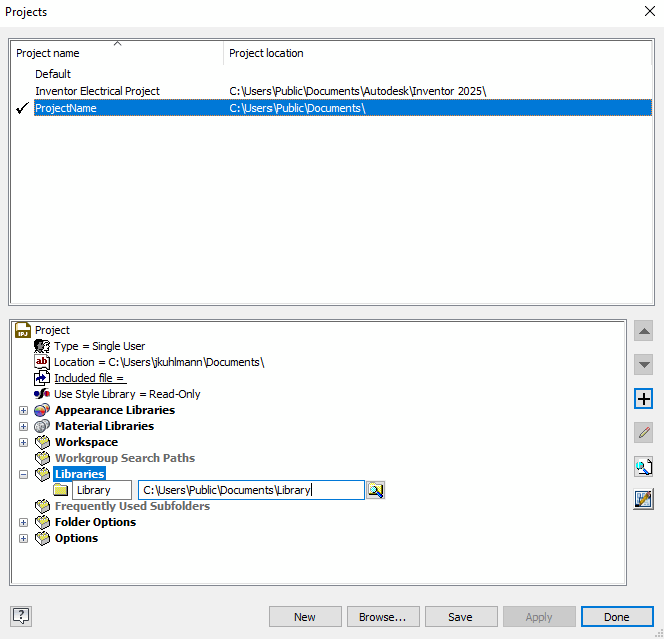
Open the Projects dialog page in Inventor.
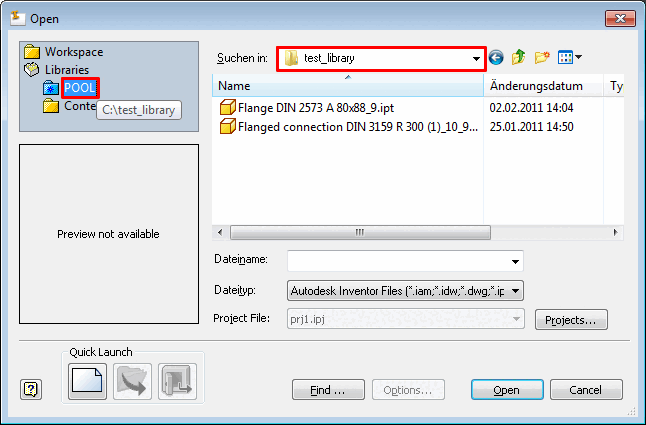
Create a library with the desired export path for the 3Dfindit components.
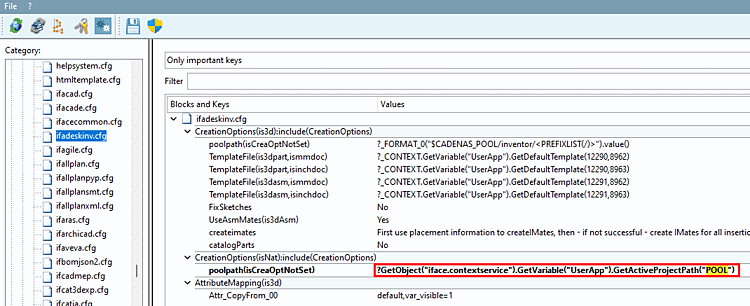
Open PARTadmin -> Category -> $CADENAS _SETUP -> ifadeskinv.cfg -> Block CreationOptions(is3d) -> Key poolpath(isCreaOptNotSet)
?GetObject("iface.contextservice").GetVariable("UserApp").GetActiveProjectPath("POOL")
(The library name is in the last bracket.)
?GetObject("iface.contextservice").GetVariable("UserApp").GetActiveProjectPath("POOL")
+GetObject("iface.calcnameservice").start(0).Format("/<PREFIXLIST(/)>").value()
<PREFIXLIST(/)>: At projects with several prefixes these are automatically prefixed in the path, separated by a slash (e.g. Norm9 [Standards], Kernloch [Core diameter]).
Now the library can be used as pool path.
![[Note]](images/note.png)