5.24.6. GeoDb
5.24.6.4.
Removing obsolete index es
|  |
| Prev | Next |
In some cases it may be useful to delete old indexes from the hard disk.
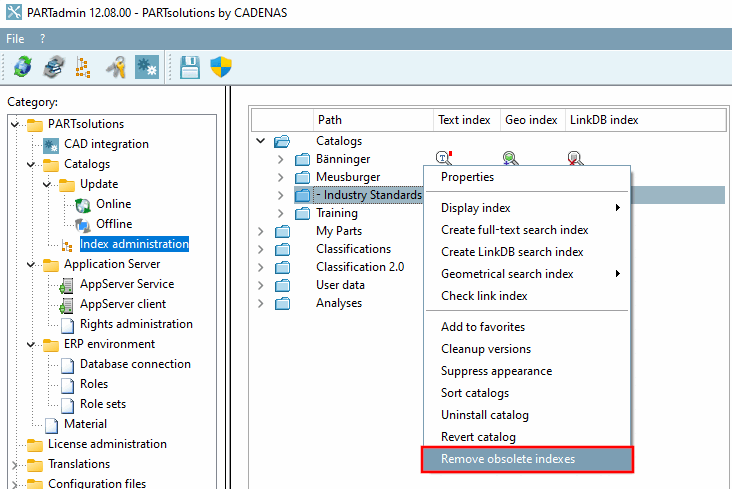
To do this, call up the context menu command Remove obsolete indices [Remove obsolete indexes] in PARTadmin > Category "Index management [Index administration] " > Context menu of an individual catalog or of all catalogs.
-> The dialog of the same name opens.
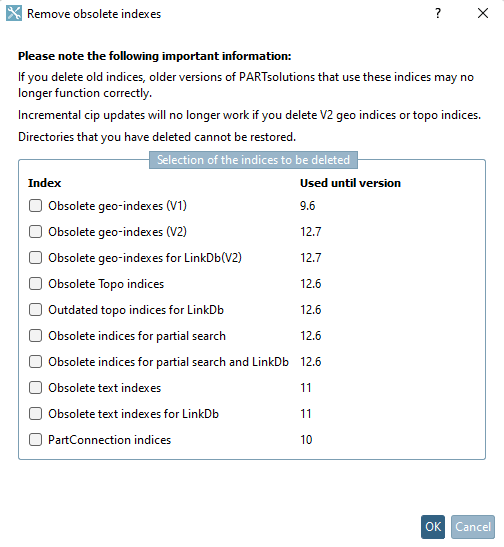
The following indexes are displayed in the dialog, can be selected using the checkbox and then deleted by clicking .
Obsolete geo indices (V1) [Obsolete geo-indexes (V1)] (used up to version 9.6)
Obsolete geo indices (V2) [Obsolete geo-indexes (V2)] (used up to version 12.7)
Please note that an incremental Cip update requires these files.
If the key UseGeoDbForGeoSearch has the value 0 in geomsearch.cfg, the files are still used for the geo search.
Obsolete geo-indexes for LinkDb(V2) (used up to version 12.7)
Please note that an incremental Cip update requires these files.
If the key UseGeoDbForGeoSearch has the value 0 in geomsearch.cfg, the files are still used for the geo search.
Obsolete topo indices [Obsolete Topo indices] (used up to version 12.6)
Please note that an incremental Cip update requires these files.
Obsolete topo indices for LinkDb [Outdated topo indices for LinkDb] (used up to version 12.6)
Please note that an incremental Cip update requires these files.
Obsolete indices for partial search (used up to version 12.6)
Obsolete indices for partial search and LinkDb (used up to version 12.6)