Chapter 8. Catalogs /
Classifications 8.7. Classifications: Installation via PARTadmin
|  |
| Prev | Next |
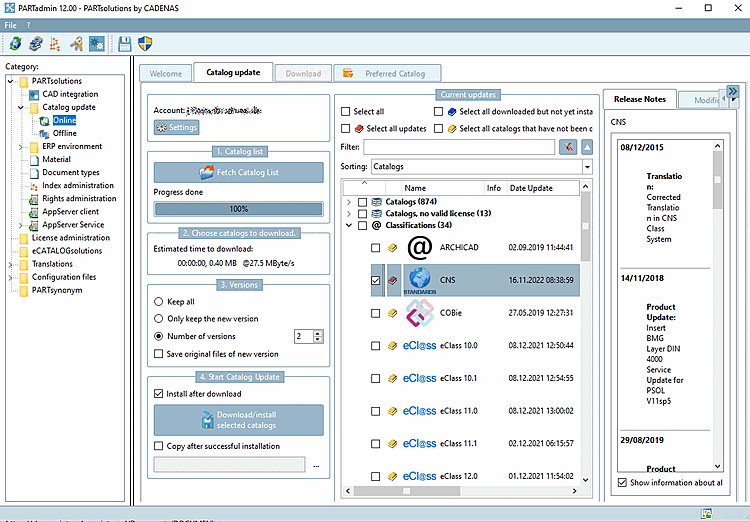
For the installation of classifications, the subsequent installation of missing classifications or the update of existing classifications, use the online installation via PARTadmin -> Catalog update -> Online.
Details on the catalog update can be found under Section 1.4.3.1, “ Catalog update Online ” in ENTERPRISE 3Dfindit (Professional) - Administration.
The following classifications are currently available:
By Countries: Classification according to countries in which the respective company sells products or has branches
CNS: CADENAS classification used e.g. for CAD integration (placement information, published elements and attributes)
CIBSE PDT: Chartered Institution of Building Services Engineers - Product Data Template
COBie: Construction Operations Building Information Exchange
Delivery Countries: Classification according to delivery countries
ECLASS: Standardized classification system for product groups and product characteristics
ETIM 4.0 to 8 (ElectroTechnical Information Model) 4.0: Classification based on the requirements of the electrical industry
ICS (International Classification Standards): International classification system for recording all economic sectors and activities in which technical standards are applied
IFC: Classification according to an international open standard for the exchange of building models
OmniClass, OmniClass 2006: Classification for mapping the entire life cycle of a building
Standards: Standardization system supplied by CADENAS. It is structured in three levels according to the DIN number.
Uniclass2015: Unified classification for UK industry for the entire construction sector
UNSPSC: Product classification specified by the United Nations. The standard represents a universal classification scheme for a wide variety of product groups for worldwide use.