6.5.4.3.2. Comments at QA status level 6.5.4.3.2.1. Changes at directory level
|  |
| Prev | Next |
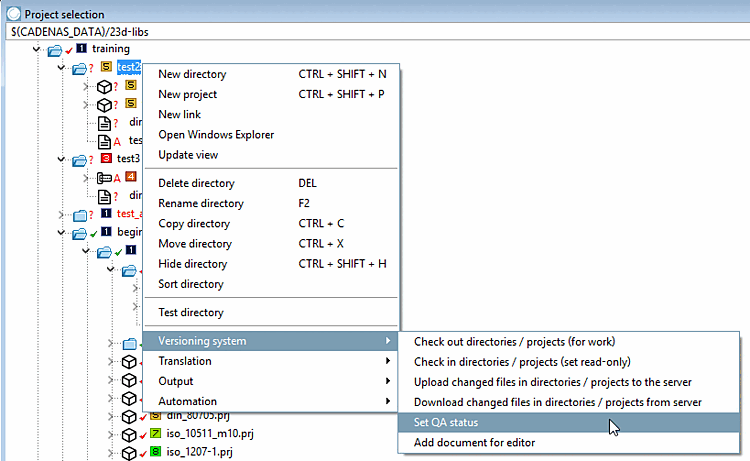
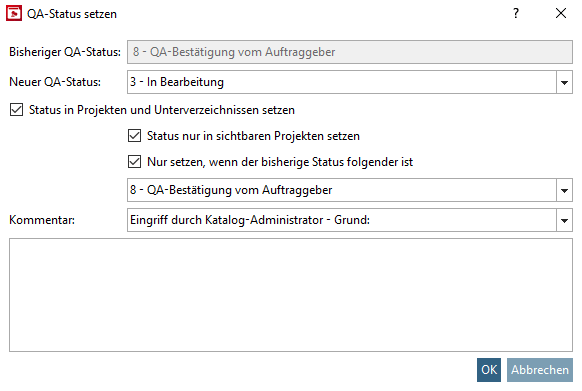
At directory level, the Set QA status menu item has no submenu items; instead, the Set QA status [Set QA-status] dialog box opens.
Under New QA status, select the status in the list field .
![[Note]](images/note.png) | Note |
|---|---|
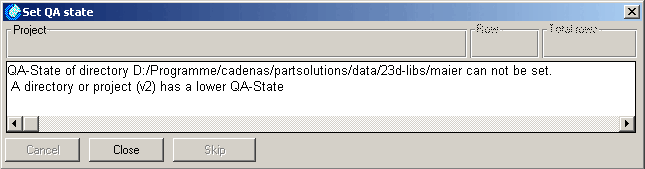
It is not possible to raise the QA status of a higher-level directory if a lower-level project/directory has a lower QA status! (See the following error message) | |
Set status in projects and subdirectories [Set status in projects and directories]:
Using the Set status in projects and subdirectories [Set status in projects and directories] option, you can also set the status in projects and subdirectories. In this case, no error message would appear.
Set status [Set status only in visible projects] only in visible projects:
For example, if you have a folder with 10 assemblies and 30 hidden projects, it is very helpful and time saving, for example, when reducing the QA state, to perform this change only to the assemblies.
Only set if the previous status is [Set only if the current status is] as follows:
You can use the additional option Only set if the previous status is the following [Set only if the current status is] to restrict or specify the status assignment accordingly.
| Note |
|---|---|
The selection of a comment in the list field is mandatory! (See Section 6.6, “ "History " tab page ”) In addition, you can enter other comments in the text field. | |