7.8.3. Change
variable value
7.8.3.1.
Variable manager - Use dictionary in the Description field |  |
| Prev | Next |
7.8.3. Change
variable value
7.8.3.1.
Variable manager - Use dictionary in the Description field | |
| Prev | Next |
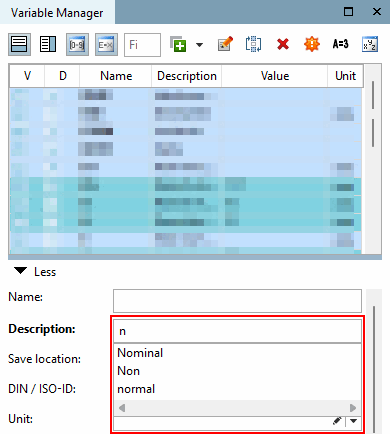
In the Variable Manager window, you can now access a dictionary in the Description field.
The catalog of this project must have a defined base language (language in which the catalog was created).
Translation suggestions must be available in the base language. These are created as soon as translations are set. The translations are saved in the following file CADENAS/user/pptranslations.txt
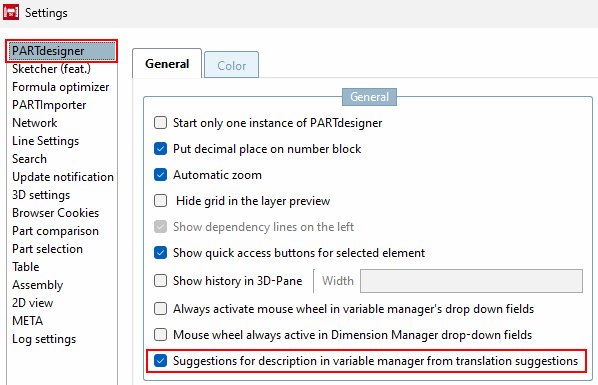
The setting Suggestions for description in variable manager from translation suggestions must be activated. This can be found in the settings under the menu item PARTdesigner in the General tab.
Functionality
To receive suggestions, a part of the word must be typed into the Description field. If there is more than one match, a list of matching words is displayed. You can scroll through the displayed elements using the arrow keys or by clicking with the mouse. The desired word can be selected by left-clicking or pressing the Enter key. If you click anywhere else in the application, the displayed list disappears.
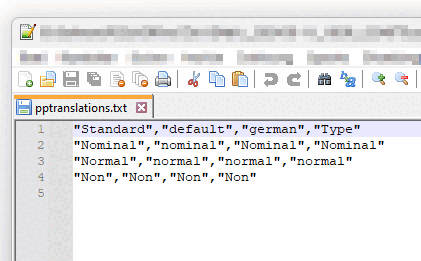
If you open the file pptranslations.txt, you can add your own terms or frequently typed words according to a certain pattern in order to shorten the subsequent processing time.
The first line must not be changed or deleted. It consists of the catalog languages and should contain the values "Standard", "default" and "Type" as shown in the figure above. The "german" is a representative example of the supported catalog languages. All supported languages must be listed. The respective value must be in quotation marks, separated by a comma and no spaces may be used.
Now you can add one word per line according to the previously defined pattern, see the illustration above.
![[Note]](images/note.png)