5.9.2.5. Menu item: Table filter
5.9.2.5.3.
Filter variable
|  |
| Prev | Next |
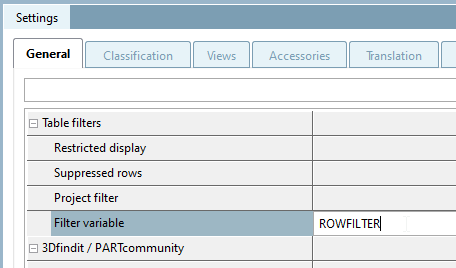
The Filter variable setting can be used to filter individual lines from the table of a project during catalog splitting. The detailed description of catalog splitting can only be found in the "Internal" manual.
To create a filter using filter variables [Filter variable], proceed as follows:
In the
PARTproject in the data
directory of the catalog to be shared, the project where the filter
should be applied.
Specify the name of the variable in the Filter variable setting.
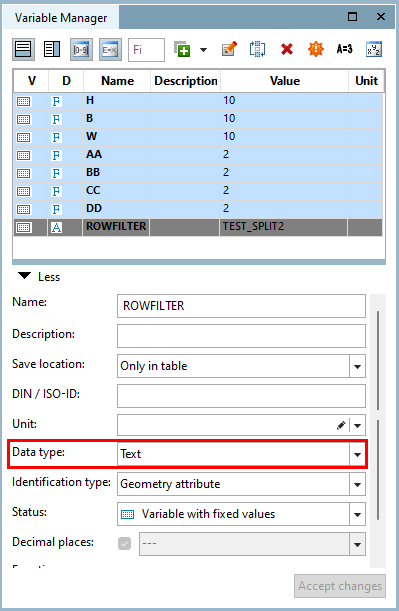
Add a variable with the name defined in step 2 via the Variable Manager. Make sure to set the data type [Data type] to "Text".
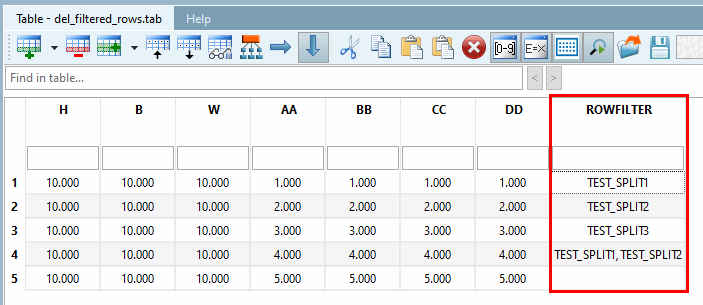
In the corresponding line of the table, enter the catalog in which the line should be visible.
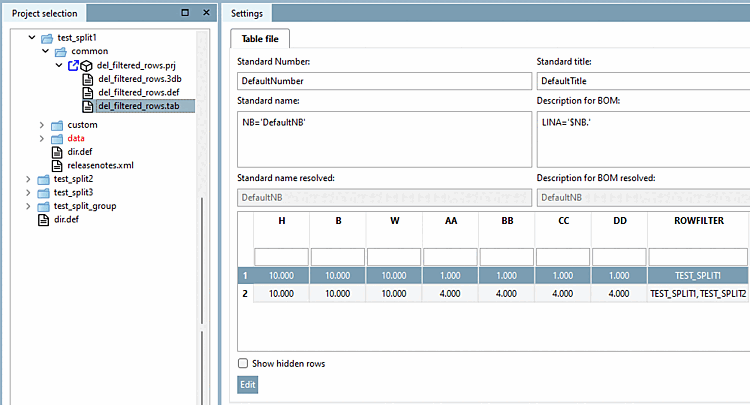
In PARTproject, enter the name selected in step 2 for each catalog folder to which the created filter is to be applied when splitting the catalog.
![[Note]](images/note.png)