3.5.2. General 3.5.2.3. LOG (formerly
called "LOD") |  |
| Prev | Next |
The definition of LOG is the graphical / geometrical representation of a product. CADENAS has a corporate definition of different LOG levels. This list represents the BIM LOG levels solely:
The target market (functional AEC/MEP or Marketing) defines the way how geometries are created. In functional AEC/MEP: rule-based modelling is required, for marketing purposes, there are no restrictions. For hybrid target markets (functional AEC/BIM and Marketing), the way how the geometries are created has to follow the LOG definition below.
Examples can be found under Section 3.5.2.6, “Sample objects”.
The level 100 does not require a 3D geometry. The empty geometry is reserved for “Symbol-only” mode in CAD.
The level 200 is designed to represent the overall shape / space consumption of the object. It can be a “bounding-box” for rectangular shaped objects, but for any other shape (cylindric, irregular) a box is too rough for LOG 200. Colors and transparencies are possible. Assemblies are possible. It is mandatory that the geometry follows the rule-based concept, and the Test-Meta AEC mode must be passed. LOG 200 is the counterpart of “LOW” in VDI 3805.
The level 300 is designed to represent the shape and more detailed version of the object, based on LOG 200. It can contain detailed shapes, such as smaller extrusions to showcase / explain functions and features of the product. If the product is an assembly, the assembly structure is recommended. Rule-based geometry concept and passed Test-Meta in AEC mode are also mandatory. LOG 300 is the counterpart of “HIGH” in VDI 3805.
The formerly described LOG 350 was only used in a few regions (FR/DE) and is no longer used in the CADENAS standard.
The level 400 is designed to showcase the entire product in all its facets. There are no fixed limitations in geometrical accuracy and feature size. It is recommended that Test-Meta AEC is passed.
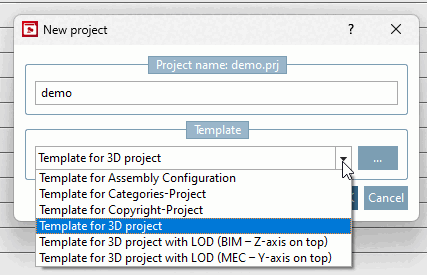
The LOG levels are contained in Template for 3D project architecture with LOG (Z-axis above) and Template for 3D project mechanical engineering with LOG (Y-axis above).
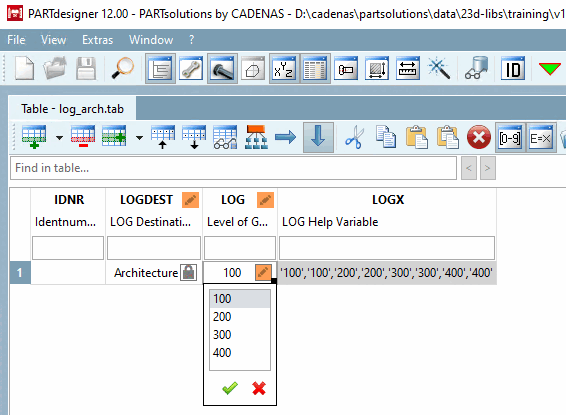
When the template is selected, the LOG control variables are created in PARTdesigner by default and later made available in PARTdataManager are made available.
For details, see Section 5.8.2.1.20.14, “ Add LOD Variables ”
![Variable manager [Variable Manager] with LOGDEST, LOG, LOGX](resources/img/img_840273271d7c4572870adc108a90399f.png)