3.5.14. LIVEsearch
3.5.14.3. Settings via PARTadmin |  |
| Prev | Next |
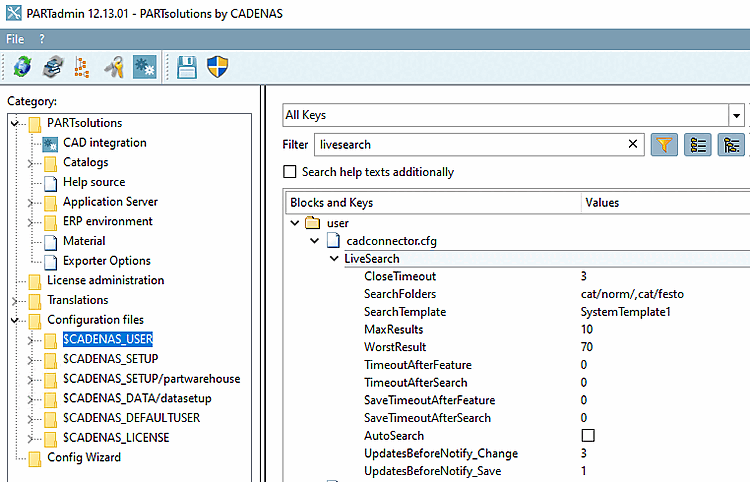
Set the desired settings in the
Configuration file under $CADENAS_USER/cadconnector.cfg:
CloseTimeout: Time in seconds after which the pop-up window is closed.
SearchFolders: Enter the desired search paths separated by commas.
SearchFolders=cat/norm/,cat/ownparts
SearchTemplate: Option to set the geo search templates for the live search. Leave the setting as default
SearchTemplate=SystemTemplate7
Key for controlling the update frequency of LIVESEARCH
If no settings are made, the display is updated with every feature change. If you do not want this, you can configure pauses.
The default value is 0 in each case, which is equivalent to deactivating the key.
Values > 0 are evaluated. The difference between the first two and last two keys is minimal. It is therefore best to only use the first two.
TimeoutAfterFeature: Time until search restarts after feature change (sec.)
TimeoutAfterSearch: Minimum time that must elapse between two searches (sec.)
SaveTimeoutAfterFeature: Time between the end of the feature and the save process (PSOL-internal) (sec.)
SaveTimeoutAfterSearch: Minimum time that must elapse between saving (PSOL-internal) two searches (sec.)
AutoSearch: Either the search is started automatically or a notification is displayed that the part has changed.
UpdatesBeforeNotify_Change: Number of part updates before a notification is displayed
UpdatesBeforeNotify_Save: Number of part saves before a notification is displayed
![[Note]](images/note.png)