5.5.2.3.
Use your own 3D model (or the one opened in 3D)
5.5.2.3.1.
3D search (single part)
|  |
| Prev | Next |
5.5.2.3.
Use your own 3D model (or the one opened in 3D)
5.5.2.3.1.
3D search (single part)
| |
| Prev | Next |
Make the settings and then click on .
Standard search: In most cases, the standard search is the best choice.
Comprehensive search [Broad search]: This search has better results on average, but a major disadvantage: Even with extremely similar parts, a similarity of close to 100% is not achieved.
Search for profiles: Best choice when searching for profiles.
Duplicate search: This template was mainly created for searching for duplicates. It works very well with high similarities, but the results with lower similarity have less significance.
Include component size [Include Part Size]: Yes/No
If the option has been set, some results may not occur in the result list, even though they are geometrically similar, however, have other sizes.
| ||||
[a] See Geo search index. | ||||
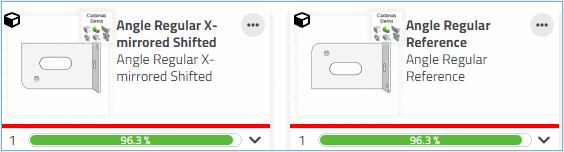
If activated, the result on the right is omitted.
Include geometric features: If a component has features that are not very important in relation to the overall size, these are weighted more heavily when activated.
a) This may lead to an exclusion of parts (if features differ) or b) to a higher ranking (if the basic shape is not very similar, but the geometrical features are).
-> Results within the set similarity are found and displayed.
-> In the search field, the search parameter (or a number of) is displayed.
![[Note]](images/note.png)