3.4. CAD-specific menu commands and information 3.4.8. Revit
|  |
| Prev | Next |
3Dfindit parts/components from BIM catalogs (such as Novoferm ) can be classified according to OmniClass, UniClass, IFC, PDT, etc. and bring this information with them when exporting to Revit.
In addition, these parts/components can also have the assignment of a Revit Family Template (*.rft) from the Revit standard, which is used as the basis for creating the Revit Family (*.rfa).[2]This means that the correct family template is automatically used in Revit, so that manual assignment of the template in Revit is no longer necessary, which makes daily work considerably easier.
Positioning information, for example "internal" for a garage door, is directly available. The corresponding extractor body is also realized directly when the door is placed in the wall according to the classification.
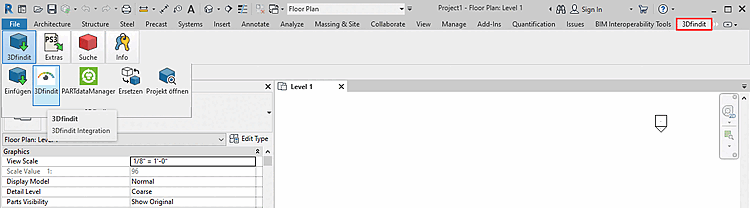
A brief overview of the 3Dfindit interface:
Specify the desired part in 3Dfindit or PARTdataManager.
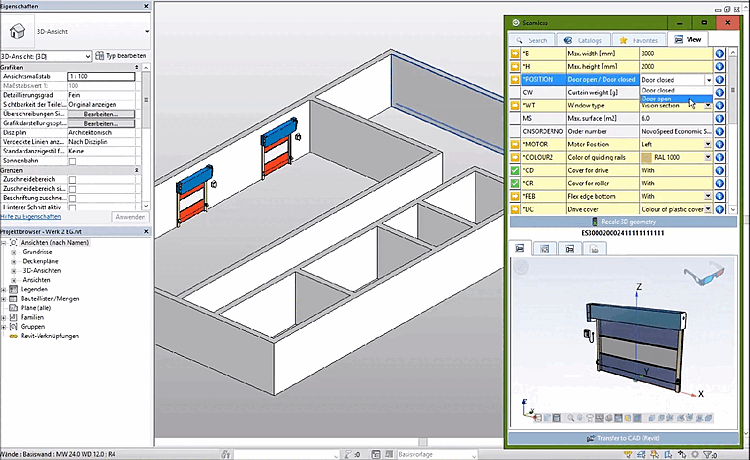
The following figure shows a garage gate from a BIM catalog.
Specify the dimensions of the gate. Choose whether the gate shall be opened or closed, the motor position, color and much more.
Determine the installation position with the cursor and perform a single click.
The garage door exported from 3Dfindit has intelligence. It "knows" how to position itself in the wall (e.g. on the inside).
[2] The selection of the family template is the responsibility of the manufacturer / catalog creator and cannot be changed by the user.

![[Note]](images/note.png)