1.7.5. $CADENAS_SETUP
1.7.5.3.
catalogicons.cfg -
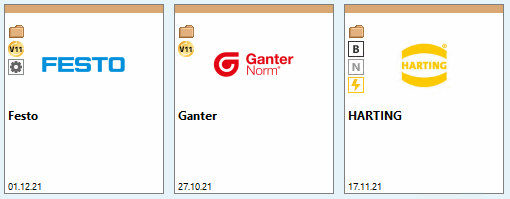
Icons on catalog preview image
|  |
| Zurück | Weiter |
In the
top right corner of the catalog preivew informative standard icons can be
displayed. E.g. "Excerpt"  or "2D"
  .
.
 C = Customer catalog: Catalog has been created by
supplier itself (not by CADENAS)
C = Customer catalog: Catalog has been created by
supplier itself (not by CADENAS)
 B = BMEcat catalog: Catalog has been created via
the electronic BMEcat exchange format
B = BMEcat catalog: Catalog has been created via
the electronic BMEcat exchange format
 N = Neutral catalog / Quick & Simple catalog:
PARTproject -> Context menu of
index tree -> Automatisierung [Automation]
-> Neutrale Formate im Batchlauf importieren (Quick und
Simple) [Batch import neutral formats (Quick and Simple)]
N = Neutral catalog / Quick & Simple catalog:
PARTproject -> Context menu of
index tree -> Automatisierung [Automation]
-> Neutrale Formate im Batchlauf importieren (Quick und
Simple) [Batch import neutral formats (Quick and Simple)]
 I = Internal catalog: Catalog is only used
internal by customer
I = Internal catalog: Catalog is only used
internal by customer
The following explains a configuration:
In the
configuration file catalogicons.cfg name and storage
location of the icon are set.
Default
storage location of icons: C:\ProgramData\cadenas\partsolutions\setup/bitmaps/catalog_icons
[TEXT] CUSTOMER=Kundenkatalog 2D=2D-Katalog EXCERPT=Katalogauszug [ICONS] CUSTOMER=C:\ProgramData\cadenas\partsolutions\setup/bitmaps/catalog_icons/catalog_icon_customer.png 2D=C:\ProgramData\cadenas\partsolutions\setup/bitmaps/catalog_icons/catalog_icon_2d.png EXCERPT=C:\ProgramData\cadenas\partsolutions\setup/bitmaps/catalog_icons/
In the
catalogicons.cfg you can look up where
these icons are and what they are called.
In the dir.prj file at the highest catalog level, the icons to be displayed is defined.
ICONS=EXCERPT
ICONS=2D
The icons may also be located in the local catalog directory. In this case, the configuration file catalogicons.cfg is not used.
ICONS=MY_ICON
ICON(MY_ICON)=catalog_icon_customer.png
ICONTEXT(MY_ICON)=My Text